
VegNT.com, the free Vegan Nutrition Tracker, has had the biggest upgrade in its history. Between July and early November 2026 the team shipped hundreds of changes: a public library of recipes and meal plans, logging a meal from a photo, family and dog profiles, designer nutrition labels, restaurant menus and a full redesign in 12 languages. This guide walks through every new feature, what it does and who can use it.
Key points
- The core calculator is still free and needs no account: add foods and see vitamins, minerals, amino acids and macros against life-stage targets.
- A free account now adds recipes, meal plans, a food diary with trend charts, custom foods, label scanning and logging a meal from a photo.
- Paid Premium and Business plans add family and dog profiles, longer statistics, branded nutrition images and restaurant menus.
Disclosure: VegNT.com is a sister project of this site. Features and prices below were checked on vegnt.com on 21 November 2026 (app version 11.175).
What VegNT is, in one paragraph
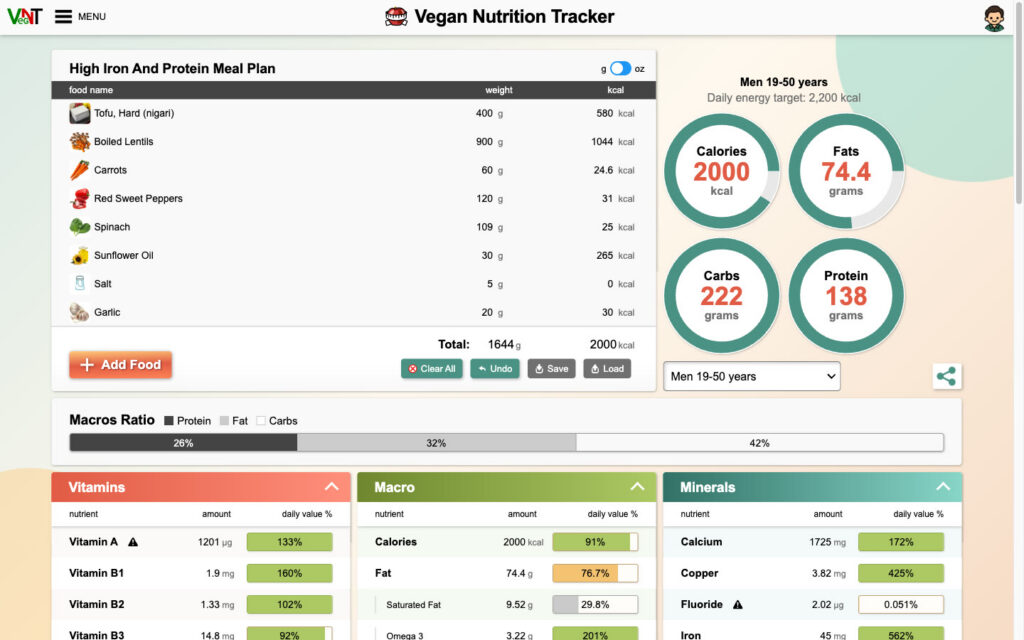
VegNT is a web app that answers one question: is a plant-based day of eating actually balanced? You add foods and amounts, and it shows totals for calories, fat, carbohydrates, protein, vitamins, minerals and both essential and non-essential amino acids. Each value is compared with a daily target for your group. Nutrient data comes from the USDA National Nutrient Database for Standard Reference, and the targets (RDAs) come from the US National Institutes of Health, as the site states in its footer. The upgrade keeps that core and builds a full nutrition platform around it.
1. A sharper calculator for everyone (no sign-up)
Anyone can open vegnt.com and start adding foods. The upgrade improves the parts people use every day:
- Life-stage targets. Pick one of 16 groups, from infants and children to adults over 51, pregnancy and breastfeeding. The home page describes pregnancy targets by trimester and a 70+ group. “Enough protein” then means something specific to that group, not a generic average.
- Gaps and upper limits. Shortfalls and amounts above safe upper limits are marked differently, so a high vitamin A or fluoride reading stands out from a low one.
- Macro ratio bar. Protein, fat and carbohydrate shares are shown as one bar above the detailed tables.
- Serving pictures. Portion pickers now show photos of common measures, which makes grams easier to estimate.
- Grams or ounces. One switch changes every weight on the page.
- Shareable lists. The food list lives in the page address, so a day of eating can be sent as a link.
- Four example meal plans. Whole-food plant-based (1,872 kcal), high-iron and high-protein (2,000 kcal), vegan keto (1,891 kcal) and low-fat (1,971 kcal) open with one click, so you can see what the tool does before typing anything.
If you want background before you start counting, our guides on plant protein versus animal protein and on vitamin C and iron absorption explain two of the questions people most often check with a tracker.
2. Public vegan recipes, made by the community
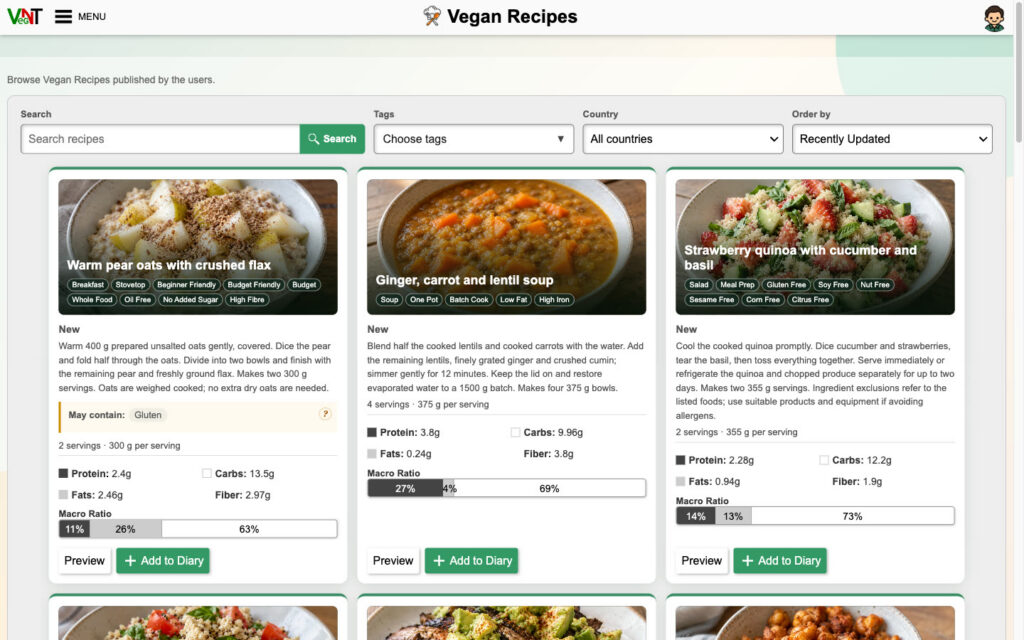
The Vegan Recipes library is new. Every recipe is built from foods in the nutrition database, so each card shows servings, grams per serving, protein, fat, carbohydrate, fibre and a macro bar. One click adds a serving to your diary.
- Search and filters: keyword search, tags (such as Budget, Batch Cook, High Iron, Gluten Free, Oil Free or Nut Free), country of origin and sort order.
- Allergen notes: cards can show “May contain” warnings.
- Publishing: free account holders can publish their own recipes. Recipes are reviewed before they go live, and publishing asks for photos of the ingredients, the batch and the plated serving.
- Ratings and creators: recipes can be rated from 1 to 5 stars, and creator profiles can link to a website or social channels.
3. Full-day meal plans you can filter by life stage
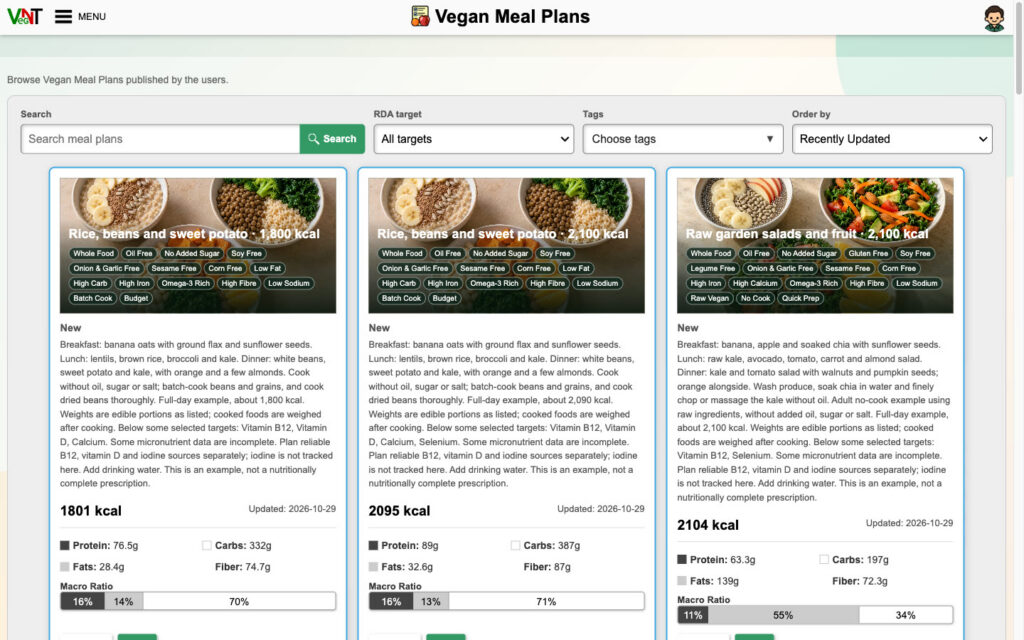
Vegan Meal Plans works like the recipe library but for whole days. The key extra filter is RDA target: you can look for plans scored against a particular age or life-stage group. Plans show total calories, macros and fibre, and each description says which nutrients still need attention. Several plans, for example, note that vitamin B12, vitamin D and iodine should be planned separately. This is honest labelling: VegNT says the plans are examples, not complete prescriptions.
4. Log a meal from a photo, scan labels and barcodes
The most visible new tool uses AI to turn a photo of your plate into a food list. VegNT splits the plate into dishes and ingredients, estimates grams and matches them to foods in its database. You review and correct everything before it is logged, and a dish can be saved as a private recipe. The free plan includes 5 meal photos a month, Premium 90 and Business 400.
Two related tools help with packaged food:
- Nutrition label scan: photograph a label to create a custom food (5 attempts a month free, 100 on Premium, 500 on Business).
- Barcode check: scanning a barcode looks the product up in VegNT’s own reviewed database and shows whether it is vegan. Users can submit missing products for review. Typing a barcode by hand is a Premium option.
5. Food diary, trends and custom foods
A free account turns the calculator into a tracker. You can keep a daily diary, save go-to meals as recipes, log a whole meal plan in one tap and add custom foods with serving sizes, allergens and up to 3 photos. The new statistics pages turn the diary into charts, so you see which nutrients stay low across days and weeks rather than on a single day. Free statistics cover up to 30 days. Premium extends this to 365 days or custom dates, adds amino acids, and can average only the days you actually logged.
6. Family profiles and dog nutrition
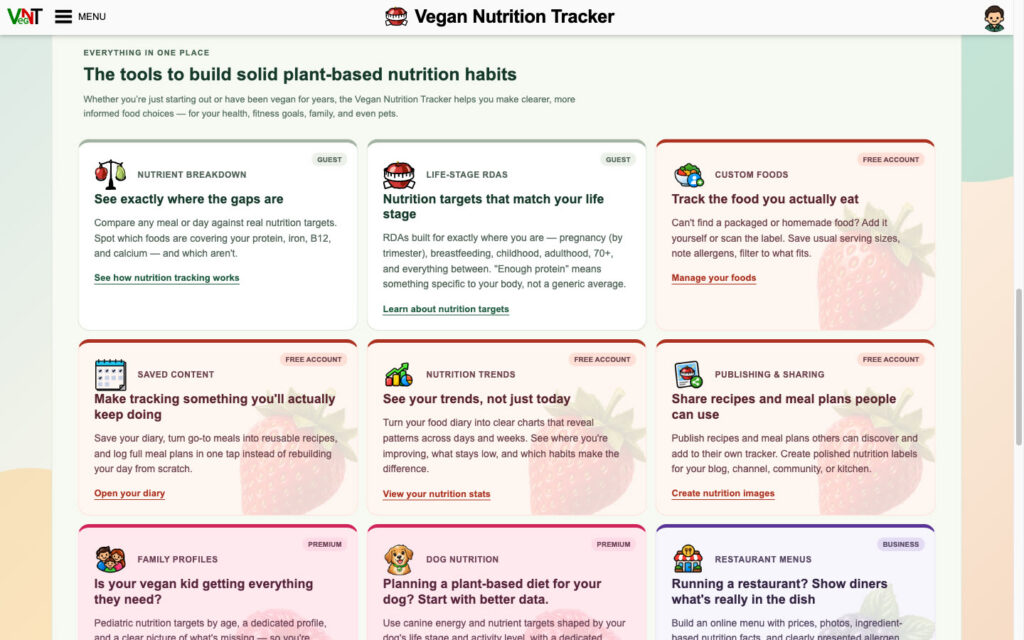
Premium adds up to 5 extra profiles. Each family member gets their own diary, targets and measurements, which helps parents see whether a child’s plant-based day covers the targets for that age. There is also a dog profile that uses canine energy and nutrient targets based on the dog’s life stage and activity level, plus a “safe for dogs” food filter. VegNT presents these as a starting point for healthy dogs. Talk to a vet before changing your dog’s diet.
7. Nutrition labels and share images
Recipes, meal plans and diary days can be exported as images for a blog, channel, social post or kitchen wall. The free templates include a US Nutrition Facts label, a UK traffic-light food label, a compact label, a macro dashboard, a saved-list card and “Cozy” social and story cards. A share dialog can copy the image straight to the clipboard. Premium unlocks extra designs and removes VegNT branding. Business can add its own logo and colours.
8. Rankings and food comparison, rebuilt
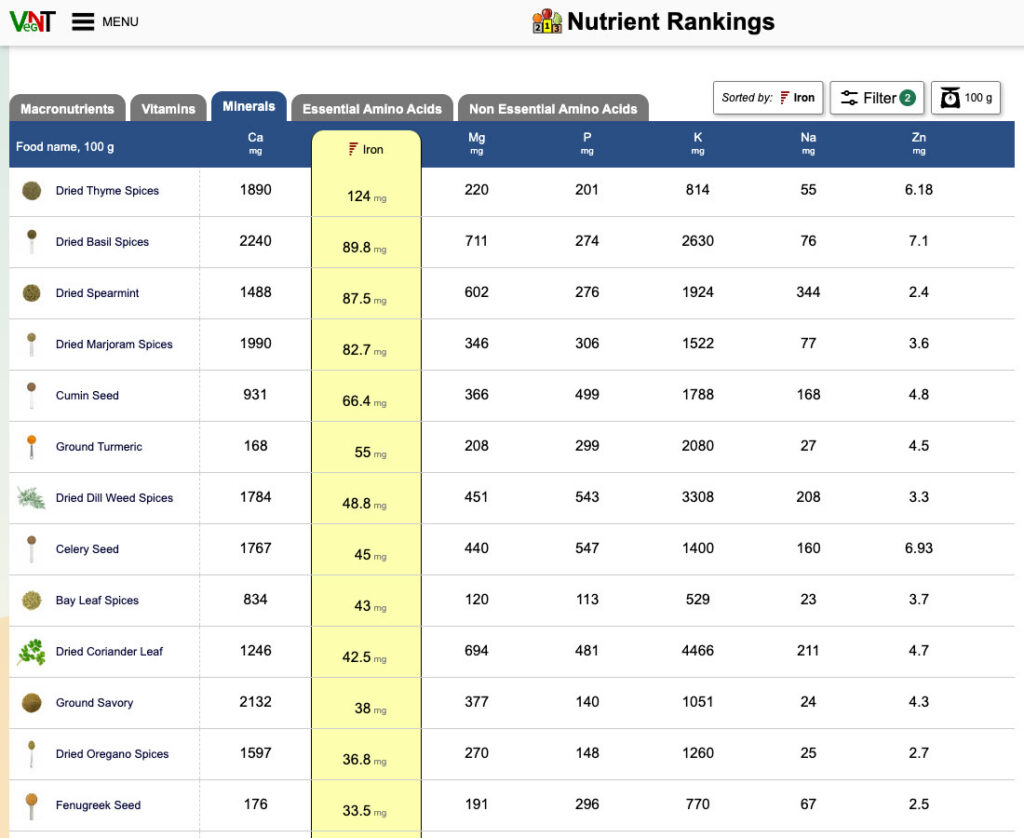
Nutrient Rankings lists the top plant foods for any nutrient, with tabs for macronutrients, vitamins, minerals and both groups of amino acids. You can rank per 100 g or per calorie and filter by food category or level of processing. Spices and dried herbs top the iron list per 100 g, which is a good reminder to check realistic portions as well.
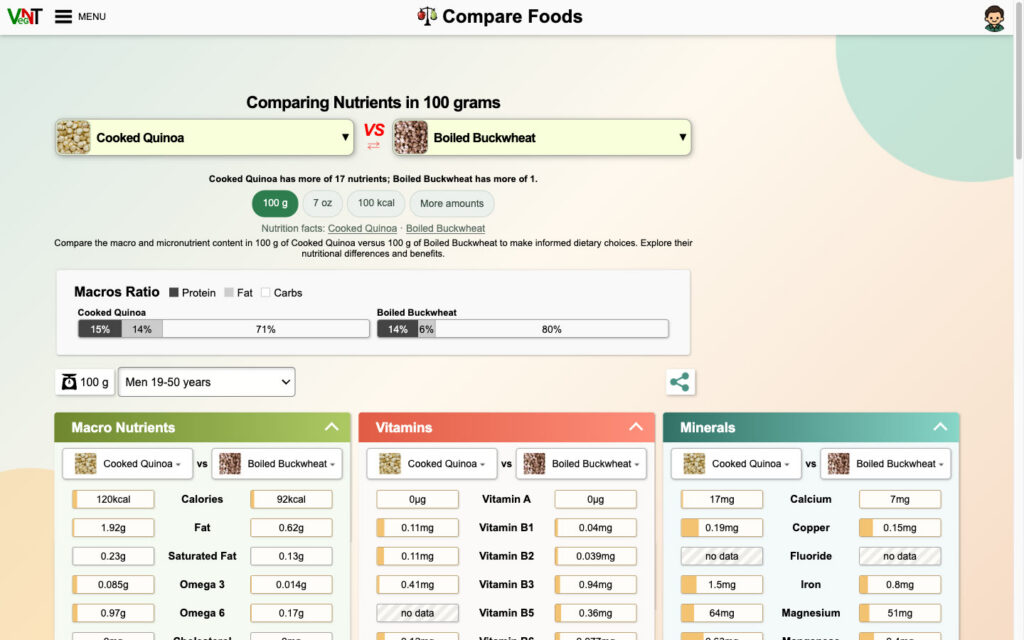
Compare Foods puts two foods side by side by 100 g, by ounce, by 100 kcal or by a custom amount, and gives a plain summary first. For example, cooked quinoa has more of 17 nutrients than boiled buckwheat, and buckwheat has more of one. Hiding foods you never eat and diet filters (keto, low-fat, high-protein, high-fibre) are included for free.
9. Restaurant menus with nutrition (Business)
The new Business plan is for cafés, restaurants and caterers. A business can create a restaurant profile and build online and printed menus with prices, photos, ingredient-based nutrition facts and allergen information. Each dish is linked to the recipe behind it, so the nutrition updates when the recipe does. Allergens are declared by the business, not guessed by software. A business can publish the nutrition without giving away the recipe. Print layouts and QR codes link diners to the live menu.
10. Easier sign-in, themes, 12 languages and guided tours
- Sign-in: Google sign-in, passkeys and single-use email links have been added.
- Themes: Cozy, RGB and Lite are free. Garden, Dark Swamp and wide-layout versions come with paid plans.
- Languages: English, German, Spanish, French, Italian, Polish, Portuguese, Romanian, Ukrainian, Turkish, Arabic and Russian. The food catalogue is translated as well as the interface.
- Help: guided tours walk through the live interface, and the help centre has been rewritten. Support conversations are now inside the account.
- Your data: you can export your data at any time or delete your account.
- Referrals: inviting friends earns free Premium days.
Plans and prices at a glance
| Starter (free) | Premium | Business | |
|---|---|---|---|
| Price (USD) | $0, no card | $20/month or $169/year | $80/month or $669/year |
| Saved recipes, custom foods, meal plans | 5 each | 100 each | 700 each |
| Statistics period | Up to 30 days | Up to 365 days or custom | Up to 365 days or custom |
| Meal photos per month | 5 | 90 | 400 |
| Label scans per month | 5 | 100 | 500 |
| Extra family profiles | None | 5 | 5 |
| Ads | Shown | None | None |
| Restaurant menus | No | No | Yes |
According to the plans page, online payment is not available yet. Paid plans are activated with a voucher, by earning Premium through referrals, or by contacting the VegNT team.
Practical takeaways
- New to tracking? Open one of the example meal plans, change a food and watch the totals move. No account is needed.
- Use a free account for a week of diary entries. Weekly charts tell you more than any single day.
- Check B12, vitamin D, iodine and omega-3 on purpose. VegNT’s own plan notes point to these nutrients.
- Food businesses can use Business menus to publish nutrition and declared allergens without sharing their recipes.
For more on the rules for describing plant-based food in Europe, see our explainer on the EU veggie burger naming law. If you would like to discuss tracking with other vegans, the Vegan Talk forum is a good place to start.
General information, not medical advice. For pregnancy, children, medical conditions or pets, speak to a qualified dietitian, doctor or vet. Last reviewed: 21 November 2026.
Sources
- VegNT.com, home page and feature overview: vegnt.com (accessed 21 November 2026)
- VegNT.com, Plans and Pricing: vegnt.com/plans.php (accessed 21 November 2026)
- VegNT.com, Vegan Recipes and Vegan Meal Plans: recipes, meal plans (accessed 21 November 2026)
- VegNT.com, Nutrient Rankings and Compare Foods: iron rankings, quinoa vs buckwheat (accessed 21 November 2026)
- USDA National Nutrient Database for Standard Reference, credited on vegnt.com as the source of nutrient data
- VegNT product documentation and release history, July to November 2026 (provided by the VegNT team)